Enhancing Creative Thinking Through Gamification in LMS Environments
 Luís M. Alves
Adina Cocu
Sandra M. Dingli
Montse Meneses
Ramon Vilanova
Luís M. Alves
Adina Cocu
Sandra M. Dingli
Montse Meneses
Ramon Vilanova
Abstract
Gamification in educational context involves applying game design elements and principles to enhance the learning experience. By incorporating the motivational features of games, it aims to engage students and support educational goals. The work presented in this article is part of ThinkGame Erasmus project. The project’s goal is to encourage the use of Learning Management System (LMS) tools, such as lessons, wikis, and online tests to create gamified experiences in programming classes. These innovative strategies are intended to boost student motivation and creativity by incorporating compelling narratives, adaptable challenges, collaborative tasks, and continuous feedback. Another important challenge addressed in the project was fostering creativity among teachers, encouraging them to transform conventional, non-gamified resources into engaging and thought-provoking activities for students. A case study composed of ten gamified experiences was developed at Polytechnic Institute of Bragança, one of the project partners, during one semester in Imperative Programming subject.
Keywords and phrases:
Creative Thinking, Gamification, LMS, Teaching ProgrammingCopyright and License:
![[Uncaptioned image]](x1.png) © Maria João Varanda Pereira, Luís M. Alves, Adina Cocu, Sandra M. Dingli, Montse Meneses, and Ramon Vilanova; licensed under Creative Commons License CC-BY 4.0
© Maria João Varanda Pereira, Luís M. Alves, Adina Cocu, Sandra M. Dingli, Montse Meneses, and Ramon Vilanova; licensed under Creative Commons License CC-BY 4.0
2012 ACM Subject Classification:
Applied computing Learning management systems ; Applied computing Interactive learning environments ; Social and professional topics Computer science education ; Software and its engineering Imperative languagesFunding:
The work of Maria João and Luís was supported by national funds through UID/05757 – Research Centre in Digitalization and Intelligent Robotics (CeDRI); and SusTEC, LA/P/0007/2020 (DOI: 10.54499/LA/P/0007/2020).Editors:
Ricardo Queirós, Mário Pinto, Filipe Portela, and Alberto SimõesSeries and Publisher:
 Open Access Series in Informatics, Schloss Dagstuhl – Leibniz-Zentrum für Informatik
1 Introduction
The ThinkGame project is framed within the Higher Education Erasmus+ EU program. It tackles key priorities by fostering innovative teaching and learning methods, while advancing digital transformation through enhanced readiness, resilience, and capacity-building. The ThinkGame project aims to modernize higher education by fostering international collaboration and developing innovative, gamified, digital learning tools for STEM students. The project helps teachers integrate gamification and creative thinking into ICT courses, creating shareable, accessible, digital content, making abstract content more engaging. It also focuses on inclusion by creating digital resources that support students from diverse socioeconomic backgrounds, ensuring high-quality education in a post-pandemic context. The main tasks proposed were to strengthen the connection between higher education systems to co-create innovative digital learning content in five partner institutions, to improve motivation and engagement in abstract STEM/ICT topics using tools offered by existing e-learning platforms based on ICT e-Competence Framework and LMS standards. The five partner institutions are the University Dunarea de Jos of Galati – Romania, University of Malta – Malta, Petroleum-Gas University of Ploiesti – Romania, Polytechnic Institute of Bragança – Portugal, and Universitat Autonoma de Barcelona – Spain. The partners use the European e-Competence Framework (e-CF) [2] to support transmissibility and sustainability. They develop online tools that can function as a complete unit-course or be adapted into separate modules for various courses, as long as they align with learning outcomes. To ensure effective use and integration, project partners will cross-utilize the tools and incorporate them into additional digital learning content for students.
Learning Management System (LMS) is defined as a web-based technology that allows managing, administering, and monitoring student learning and performance in an online teaching environment. The adoption of LMS in higher education institutions is now an increasingly evident reality. Moodle, Sakai, Canvas, Google classroom are some of the most used platforms worldwide. Sakai [20] is an online LMS with many features for teaching, learning, and collaboration. It allows one to create and organize lessons, modules, quizzes, tests, assignments, and more. It is an LMS with many useful features, some of them we can apply to create gamification experiments.
The use of gamification in teaching in the ICT area has already been a reality in the last decade. Wangenheim and Borgatto used an educational game for teaching SCRUM in computing courses. They evaluated motivation, user experience, and the game's contribution to learning through case studies on Kirkpatrick's level one based on the perception of the students. Their results indicate the potential of the game to contribute to the learning of SCRUM in an engaging way, keeping students immersed in the learning task [24].
Paiva et al. developed a service for gamification of learning activities called Odin. In their paper, the authors describe Odin, its role in an e-learning system architecture requiring gamification, and details of its implementation. According to the authors, the validation of Odin involved the creation of a small e-learning game, integrated in an LMS using the Learning Tools Interoperability (LTI) specification [17].
Frost et al. developed a study to see if gamification of an LMS would represent an increase in a series of desirable outcomes: student interest, motivation, satisfaction, student learning, and perception of pedagogical affect. These constructs were measured in a survey, except for learning, which was measured by grades. Based on the survey response, the authors concluded that open-ended responses suggested that students appreciated some gamification aspects, and the quantitative data suggested that gamification has virtually no effect on the constructs measured. They also concluded that only relatedness (a sub-construct of motivation) and student interest were found to be significant, although with small effect sizes [8].
Ofosu-Ampong and Boateng conducted a study examining students’ and administrators’ perceptions of game elements in preparation for gamifying Sakai, the LMS used at the University of Ghana. The results indicate that gamification is a relatively new concept in this context, yet students responded positively to the idea of incorporating game elements into Sakai. Moreover, students who expressed interest in these additions perceived them as incentives to engage with the LMS more frequently [16].
Spanier et al. present a classification scheme for gamification in Computer Science Education. According to the authors, gamification presents a great potential to improve user engagement, motivation, and learning in nearly all fields of study, including Computer Science education. Their study focuses on Data Structures and Algorithms (DSA) courses. Based on their analysis, a classification system was created, and two new abstract genres identified: dynamic gamification and collaborative gamification development [21].
Wadhawan and Mishra present a study that explores the impact of LMS on fostering creative and collaborative learning environments in design programs. According to the authors, by leveraging digital tools such as discussion forums, virtual studios, and collaborative project management features, LMS can transform traditional pedagogical approaches, making them more interactive and engaging. The study allowed them to conclude that the overall impact of LMS on design education is positive, with significant improvements observed in student collaboration and creative output [23].
The central question addressed in this project is: Is it possible to implement meaningful gamification experiences using only LMS tools? This study focuses on the work developed by the Polytechnic Institute of Bragança (IPB) during the first semester of the 2024/2025 academic year, within the Imperative Programming course. At IPB, the Learning Management System is based on Sakai, which offers a range of tools such as lessons, wikis, quizzes, forums, and gradebooks [22].
The course unit Imperative Programming selected for implementing the gamification experiments, at IPB, is focused on the C programming language and is part of the Bachelor's Degree in Informatics Engineering. This course has a total of 188 enrolled students, distributed across five classes labeled A through E. For the purpose of the experiment, two classes were chosen: Class A, consisting of approximately 25 international students, and Class B, with around 30 Portuguese students. Each gamified session lasted 30 minutes and was conducted once a week, at the end of the regular class. The experiments ran for 10 weeks throughout the semester, from September 2024 to January 2025.
This paper is organized as follows: Section 2 presents a literature review on creative thinking and gamification in the teaching and learning process. Section 3 describes the Sakai-based LMS Tool for Gamification employed in the study. Section 4 outlines the framework used to implement gamification experiences in the Imperative Programming course at IPB, utilizing features available in the Sakai platform. Section 5 presents the results and discussion, focusing on data obtained from student responses to assessment questionnaires administered at the conclusion of each game. Finally, Section 6 provides conclusions and directions for future work.
2 Creative Thinking and Gamification in the teaching and learning process
The work developed within the scope of the ThinkGame project has always been preceded by some training in the area of pedagogical innovation, particularly gamification. This subsection aims to go back to the first publications where these concepts were introduced.
2.1 Creative Thinking
De Bono considers creativity to be a skill which can be improved with practice [5]. Its successful implementation requires both divergent thinking (“lateral thinking”) and convergent thinking (“vertical thinking”), as ideas should first be generated before they are judged, assessed or evaluated [4]. Creativity is useful in situations where an out-of-the-box solution to a problem is required or when a difficult decision needs to be made. It is considered to be a key 21st century skill [18, 15, 19, 10]. Davies discussed creativity as one of WHO’s five basic life skills as he states that “they (life skills) are also attractive to employers, who need workers that are mentally stable and well equipped to handle challenges and responsibilities that aren’t listed on the job description” [3]. The inclusion of a test for creative thinking in the 2022 Programme for International Assessment (PISA) highlights the importance of preparing students for future challenges [10]. There is no consensus on one definition of creativity. However, originality is one key element. Guilford, one of the founders of creativity research, defined creativity as the ability to produce ideas that are both novel and useful, emphasizing divergent thinking as central to the creative process [11]. Creativity was characterized by traits such as flexibility, originality, fluency, and elaboration; and Guilford highlighted its importance in education, industry, and problem-solving [11]. More recently, Goodman and Dingli defined creativity as a process that involves the generation of novel and valuable ideas, emphasizing its role in fostering innovation. In their view, creativity is a dynamic skill for adapting to rapidly changing environments, particularly in the context of personal and organizational success [9].
2.2 Gamification
Deterding et al. had defined gamification as “the use of game design elements in non-game contexts” (p.1) [6]. A more complex definition was proposed in [12] and [13]. Huotari and Hamari define gamification as “a process of enhancing a service with affordances for gameful experiences in order to support users’ overall value creation” (p.19; p.25). In their view, “gamification could be understood more broadly as a process in which the ‘gamifier’ is attempting to increase the likelihood of the emergence of gameful experiences by imbuing the service with affordances” (i.e., “any qualities of the service system that contributes to the emergence of gameful experience”) ([13], p.25). Huotari and Hamari claim that “The core service of the game is to provide hedonic, challenging and suspenseful experiences for the player(s) or gameful experiences” (p.19) [12].
2.3 Creativity and Gamification
Creativity in gamification refers to the innovative and imaginative application of game design elements and principles to enhance learning and engagement. It involves not only the development of game mechanics and dynamics but also the ability to think outside traditional boundaries to create meaningful, engaging, and enjoyable experiences. Research has demonstrated that creativity and gamification motivate students to become more engaged in tasks that may otherwise be considered tedious and shift students’ attention from a bored and passive mode of engagement to a more active one ([14], [25]). The integration of gamification techniques, such as points and rewards systems (e.g., leaderboards, badges, etc.) into the learning process motivates students and creates a more engaging learning environment.
Implementing creativity methods, techniques, and tools in the gamification process for educational games may significantly enhance engagement and learning ([1]). Some methods for this to be effectively implemented include the incorporation of creative thinking frameworks, such as de Bono’s Lateral Thinking methods ([4]), or SCAMPER [7], where students are encouraged to Substitute, Combine, Adapt, Modify, Put to another use, Eliminate, and Reverse elements related to existing concepts, issues or problems. Role-playing activities and simulations encourage students to think creatively and critically. Risk-taking should be supported, and an environment where students feel comfortable experimenting and sharing their out-of-the-box ideas should be encouraged. The integration of various creativity tools into the gamification process makes it possible to create a dynamic educational experience that challenges, motivates, and engages students, enabling the enhancement of their creative thinking skills, and cultivating the development of essential 21st century skills [19].
3 Using a Sakai-based LMS Tool for Gamification
IPB.Virtual is the LMS platform used at the Polytechnic Institute of Bragança (IPB). As mentioned earlier, it offers a variety of tools; however, for the purpose of implementing the gamification activities without using extensions or external tools, only three were selected: Lessons, Wiki, and Online Tests. These tools were strategically chosen to support different aspects of the gamified experience, like content delivery, collaborative work, automatic evaluation, and feedback.
3.1 Lessons
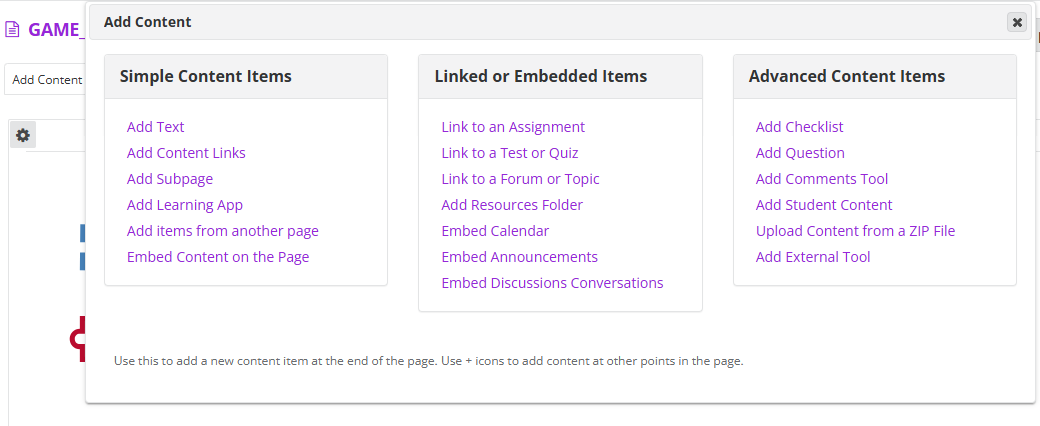
Within the course area, users can create as many lessons as needed. Each lesson serves as a container for content that can be built by combining various types of elements. Lessons support the creation of a structured narrative, allowing the integration of text, images, external links, and embedded questions (see Figure 1).
Two types of questions, multiple-choice and short answer, can be inserted directly into the lessons. Both question types can be configured for automatic evaluation, enabling immediate feedback and facilitating formative assessment.
An example of a multiple-choice question created within a lesson is shown in Figure 2.
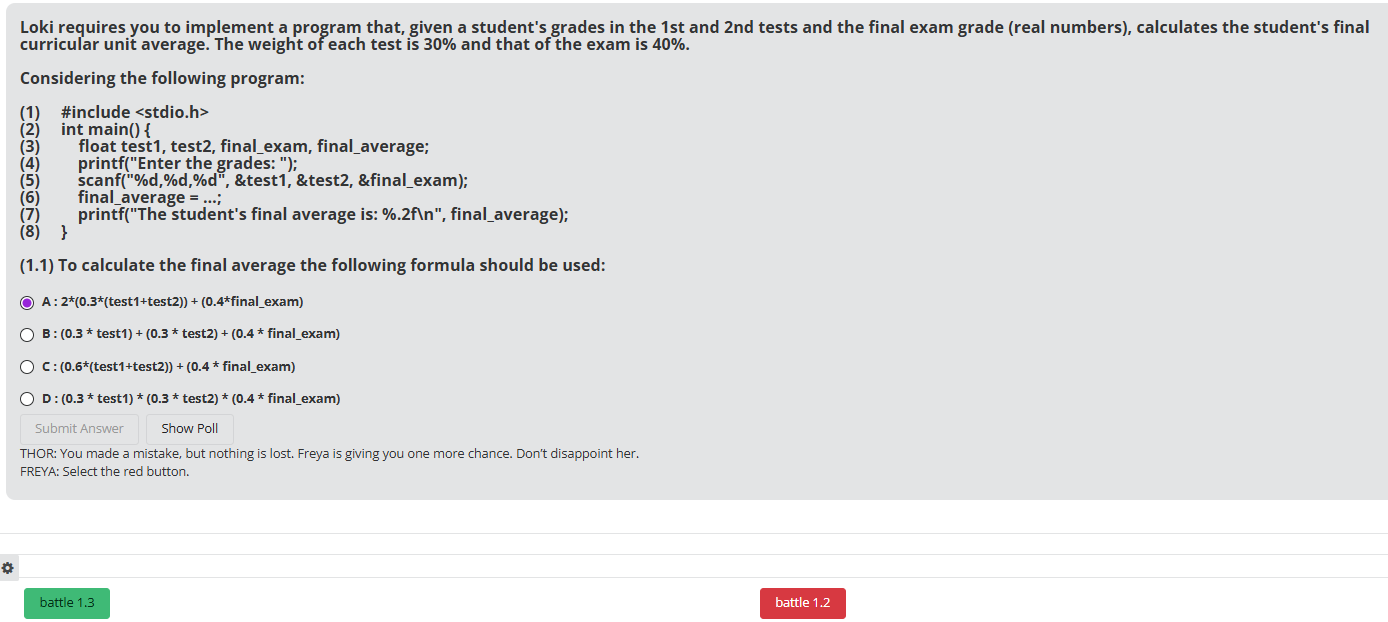
However, the types of questions available are limited, and the editing features come with certain constraints. For example, it is not possible to include images in multiple-choice questions within lessons, something that is allowed in the Online Tests tool. To address these limitations, it is possible to insert direct links to online tests from within a lesson, offering a way to expand the range of question types and formatting options.
When a student answers a question incorrectly, the system can provide explanatory feedback, along with links to relevant texts, websites, or videos. This helps students strengthen their understanding of the topic and better prepare for subsequent questions. Buttons can also be inserted within lessons to link to other sections, questions or resources. To each question can be assigned a specific number of points, and all scores are automatically recorded in the gradebook, streamlining the assessment process.
3.2 Wiki
The Wiki tool in Sakai serves as a collaborative platform where users can create and edit interlinked web pages within the course environment. It is designed to support group collaboration, knowledge construction, and project-based learning. Each participant can contribute content, make revisions, and build upon the work of others, making it an ideal tool for encouraging peer interaction and cooperative learning.
Instructors and students can use the Wiki to document processes, share research, develop group reports, or co-create study materials. The tool maintains a complete version history, allowing for transparency in contributions and enabling the instructor to monitor individual involvement.
The Wiki tool can be effectively leveraged for team-based challenges or collaborative writing activities. For example, students may be tasked with completing sections of a document or working together to solve problems and share content or data. This collaborative approach promotes engagement, strengthens teamwork and soft skills, and reinforces course content through active participation.
3.3 Online Tests
To implement online tests in Sakai, a pool of questions must be created first. Each test then draws its questions from a selected pool, allowing for question reuse and structured assessment design.
Typically, the student receives a set of questions and is required to answer them sequentially, with no possibility of returning to previous questions. In this mode, feedback is only provided after the complete submission of the test. Alternatively, feedback can be shown immediately after each question, potentially revealing the correct answer; however, in such cases, the student is still allowed to change their response, which may not be suitable for high-stakes evaluations.
The order of questions can be either randomized; to discourage sharing and ensure uniqueness; or predefined if a progressive difficulty strategy is preferred. Each question is created using a rich-text editor, allowing for the inclusion of formatted text, images, hyperlinks, and other multimedia elements.
Questions can be designed to award points for correct answers, and the time taken to complete them can also be factored into performance evaluation.
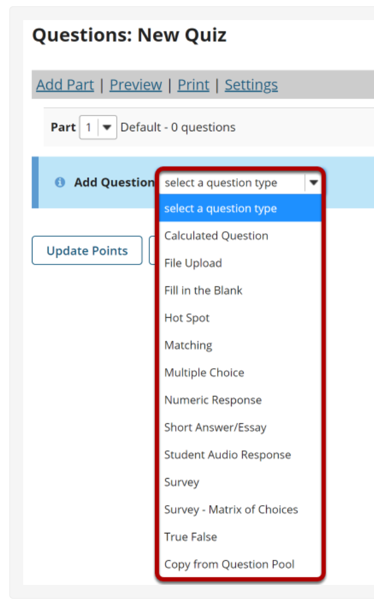
Tests offer a wider variety of question types, such as calculated questions, file upload, fill-in-the-blank, hot spot, matching, multiple choice, numeric response, short answer, and true/false. Various types of multiple-choice questions are supported, and feedback can be provided at the individual option level, as well as at the end of the question.
The menu to insert a new question is shown in Figure 3.
Tests must be configured with specific start dates, times, and duration limits. For enhanced security, the LockDown Browser can be enabled, preventing access to external websites or applications during the test. All responses and grades are automatically linked to the Gradebook, and instructors can customize navigation rules and post-submission messages to guide or motivate students.
4 Guidelines to implement gamification features in LMS – IPB Case Study
This section presents the framework used to implement gamification experiences in the Imperative Programming course at IPB, utilizing tools available in the Sakai platform. It is important to note that equivalent tools exist in other learning management systems, such as Moodle.
4.1 Step by step
Our gamification experiences involve the following steps:
-
1.
Create a narrative to be used in all games. In that way the students can recall easily the context from one game to another and keep the focus on the proposed challenges.
-
2.
Select the appropriate tool to develop the game considering the topics and the learning outcomes. In case of the Sakai system the games can be implemented using three different tools: lessons, wiki and online tests.
-
3.
Depending on the tool chosen, organize the activities, define the instructions to be given to the player, select exercises about the topic, select the question types to be used, include them into the game script, adjust the dynamics (game flow), prepare the feedback, help links and motivational messages. The idea is to implement each gamification element using the available resources (see Table 1).
-
4.
In case of programming language exercises, a wide variety of tasks can be proposed to be performed: guessing the output of a program or a set of instructions, completing programs, detecting syntax errors, identifying equivalent instructions, understanding the semantics of instructions, giving examples of program interaction with the user, ordering the instructions of a program, reducing the number of lines of code to maintain functionalities, analyzing the change in variable values, analyzing possible change or optimization of instructions, understand the execution of the program (notably regarding the number of iterations) and given an output indicate which instruction produces it.
-
5.
Creatively integrate badges and penalties into the game flow: incorporate optional extra challenges; vary the points awarded for each completed task, and connect to the gradebook; display rankings to encourage healthy competition; assign badges at the end of each level, and offer rewards such as bonus points to recognize outstanding performance and sustain engagement.
4.2 Gamification features
When designing a gamified experience, it is needed to identify how each gamification element can be implemented using the available resources. The mapping exercise done at IPB is detailed in Table 1.
| Gamification Element | Description | IPB case |
|---|---|---|
| Goals & Objectives | Clearly defined targets that users strive to achieve. | Be able to read, understand, evolve, and write C programs. |
| Rules & Constraints | Guidelines that dictate how users can interact within the system. | Instructions to “play” (including date, or time limit). |
| Challenges & Quests | Tasks or missions that users complete to progress. | Tasks are programming exercises. |
| Points | Numerical values assigned to indicate progress when completing actions. | Numerical values assigned to exercise/task. |
| Badges & Achievements | Visual or symbolic rewards for milestones and accomplishments. | Satisfaction to reach a new level, or upon completing the experiment. |
| Leaderboards | Rankings that compare users based on performance. | Scores ranking (gradebook). |
| Levels & Progression | A system where users unlock new content or privileges by advancing. | Different exercises divided into different levels. |
| Rewards & Incentives | Tangible or intangible benefits that motivate users (e.g., discounts, extra features). | Motivational messages, points (correct answers), bonus points as rewards for time spent. |
| Feedback System | Immediate responses to user actions, such as notifications or score updates. | Feedback for wrong and correct answers, and final report with punctuation and performance explanations. |
| Social Interaction | Multiplayer elements, team collaboration, or competition among users. | Competition among students/players to perform the tasks in less time, team collaboration in multiplayer games. |
4.3 Creating the narrative
An action-adventure game was designed using Artificial Intelligence (AI) to generate a set of characters and environment images. Players assume the role of a Code-Warrior who must conquer the Digital Valhalla (DiVa) Palace located in a cyber cloud. A Code-Warrior must battle Loki and conquer the DiVa Palace by gaining programming skills. The player, Code-Warrior, will receive hints and feedback from benevolent gods, Odin, Thor, and Baldur, and friendly goddesses Saga and Freya. These goddesses will assist the Code-Warriors in entering battle games by overcoming various challenges and defeating Loki’s cheating tricks along the way. Odin, Baldur and Thor are responsible for providing the necessary help, clues and feedback throughout the game. The goddesses Saga and Freya guide the player through the various stages and award points and encourage them to continue to the end. Challenges overcome are recognized both by awarding points and by granting access to subsequent stages, providing intrinsic satisfaction to the learning process.
4.4 Creating lessons for gamification
Before creating the lesson content, the first step involves defining a set of challenges. These challenges are based on small C language programs and include a wide variety of task types, as was stated in 4.1. The second step is to define the flow of the game-like experience. This includes ordering the challenges logically, assigning points for each correct answer, and implementing branching paths based on the results of previous questions (game flow). Personalized feedback should be designed for each possible answer, incorporating motivational messages, hints, links to supporting resources, and guidance to the next task. Additionally, final messages and rewards should be prepared for students who successfully complete the full set of challenges.
The third step involves building the lesson in the LMS, inserting elements one by one based on the previously defined structure. Unlike online tests, where questions can be randomly selected from a pool, the Lessons tool supports a sequential and adaptive challenge structure. Different narrative paths can be created depending on the student’s responses.
Text and images can be used between questions to provide context or guidance. For each question, instructors can configure point values, feedback, disable resubmission, enable automatic grading, and link results directly to the Gradebook. Buttons are used for navigation between sections, and color-coded buttons can differentiate between normal progress and recovery paths. This allows for the implementation of personalized learning paths within the same lesson.
To enhance immersion, Valhalla characters are integrated into the narrative to guide students through the experience. As illustrated in Figure 2, navigation buttons can be embedded via subpages, allowing students to move forward based on their choices and performance.
Feedback can be provided either per answer choice or per question, offering corrections, explanations, and guidance. All activities are connected to the Gradebook, which automatically collects scores and enables the creation of a final leaderboard or ranking.
Creativity techniques can also enhance the design of game mechanics. For instance, in one of the games developed for the Imperative Programming course, students are presented with a single C program accompanied by five encrypted questions. To access the questions, they must first implement a decryption function. Once decrypted, the goal is to answer all questions as quickly as possible. To introduce time-based challenges within lessons, a final task can be included that requires students to upload a file, which is then timestamped to assess completion speed.
4.5 Creating wiki pages for gamification
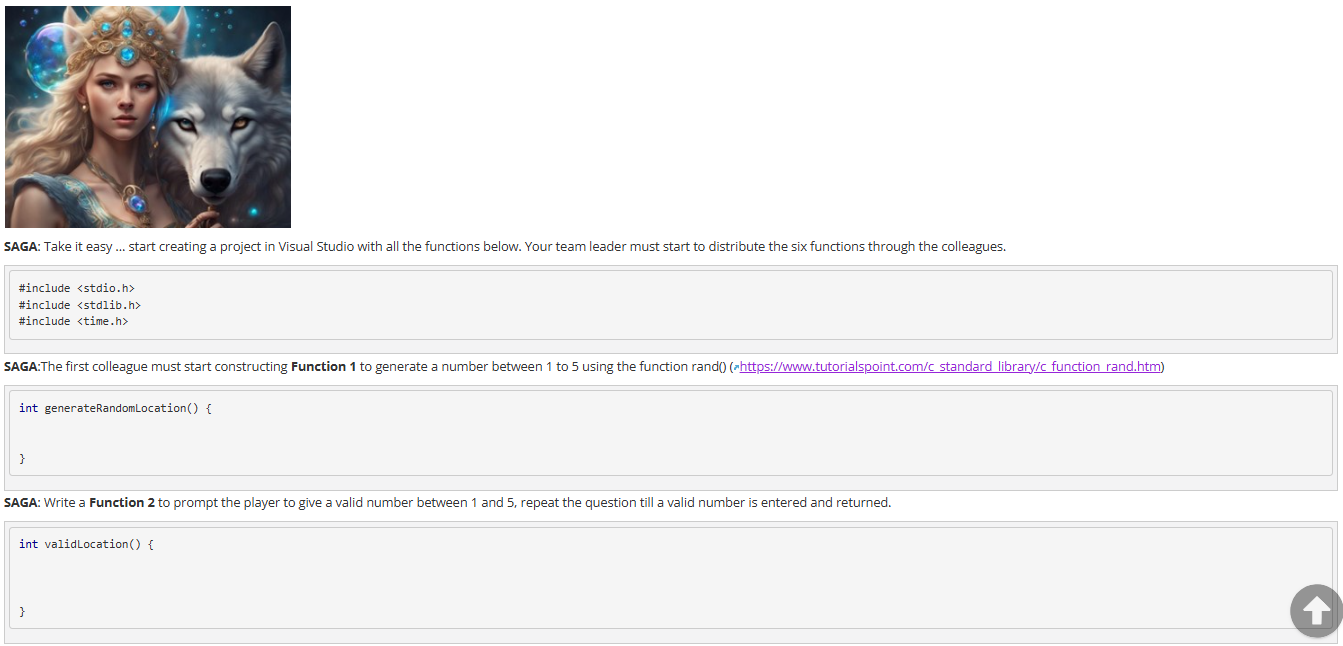
The Wiki tool in Sakai is a powerful feature for implementing collaborative work and fostering team-based learning. Within the gamified experience developed for the Imperative Programming course, a dedicated wiki page was created for each group of students. These pages included: a description of the activity, a set of function prototypes and a pre-defined main() function. To facilitate collaboration, the instructor organized the class into groups and identified a group leader for each team. The group leader received special instructions and was responsible for assigning roles to team members. Each student was tasked with developing specific functions, contributing directly to the shared wiki page.
The group leader played a central role, overseeing the team’s progress and ensuring that all functions were correctly implemented and integrated into the final solution. Additionally, the leader could evaluate each team member’s contribution, post program outputs as comments on the page, and guide the overall coordination of the task.
All student contributions remain visible on the wiki page, providing a transparent record of collaboration. This allows for manual evaluation by both the group leader and the instructor, based on the content developed and the team dynamics observed during the activity. The benefits of this approach are:
-
Students can edit code directly within the wiki page, making it suitable for collaborative programming tasks.
-
The comment feature can be leveraged for communication between team members and with the instructor.
-
Although automatic evaluation is not available in the wiki tool, outcomes can be validated by having leaders or teachers upload results or insert reflective comments.
This format promotes not only coding skills but also critical soft skills such as communication, task delegation, peer evaluation, and project coordination, which are essential in professional software development environments.
An example of a collaborative wiki activity setup is shown in Figure 4.
4.6 Creating online tests for gamification
There are several key differences between Lessons and Tests in Sakai, especially when used in a gamified environment. Tests offer a wider variety of question types, as previously mentioned. But it is also essential to note that not all question types support automatic evaluation, so instructors should choose compatible question types for the gamified experience. Additionally, it is possible to randomize questions in Tests, which isn’t an option in Lessons. Multiple submissions are allowed in Tests if feedback is provided at the end, but for gamified activities, multiple submissions should be restricted to maintain the integrity of the game. Time limits can be set for Tests, which is ideal for creating time-sensitive challenges. After completion, a detailed report is generated for each student, including feedback, scores, and time spent.
In test questions, it is also possible to include narratives, motivational sentences, and help links, which helps maintain the context narrative throughout the test. The feedback can explain the correct answer, provide a final score, and show the time taken, all of which are valuable for gamifying the experience. Navigation rules between questions can also be defined, allowing for a customized flow. Linear navigation was chosen in these activities to simulate the game flow, but in some cases, the challenges were selected randomly from a pool of questions.
The form used to specify the question structure and feedback can be seen in Figure 5.
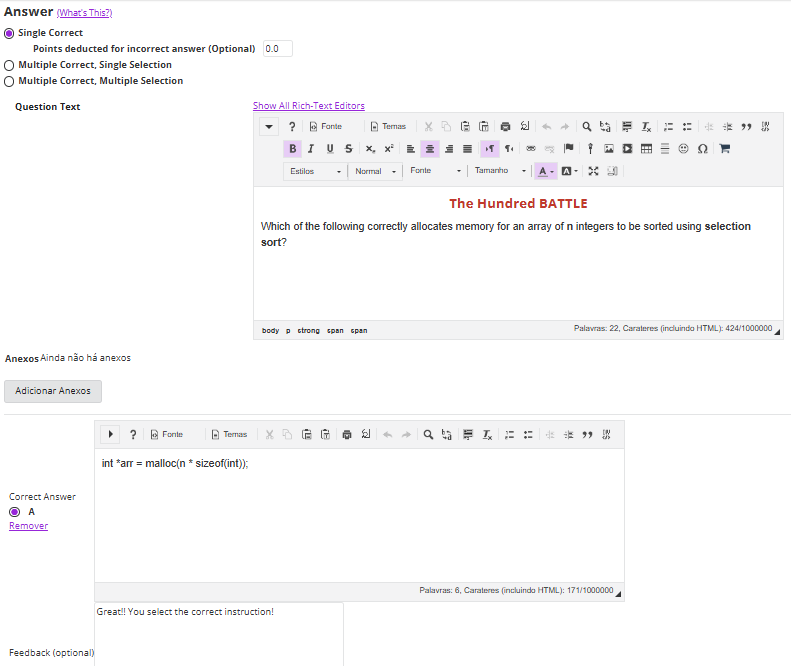
When creating tests, the teacher needs to select appropriate exercises related to the topic, prepare feedback, and adjust test parameters such as time limits. The teacher also needs to assign points to each question and ensure the setup aligns with the gamified structure.
Test configurations include setting the start date, time, and duration, with the option to enable the LockDown Browser to prevent external distractions. Results are automatically recorded in the Gradebook, and final scores can be used to generate a player ranking.
4.7 Setting up the experiment
As stated, ten gamified experiments were implemented once a week, inside the classroom (last half hour of the class), during ten weeks. Table 2 shows the topic of each game, its name, and the tool used.
Each gamified activity consists of around 10 questions, with a maximum of 100 points in total. The time spent by the teacher to implement these activities is divided into three parts: selecting a set of exercises or challenges, creating a context and script for the experiment, and implementing it in the LMS tool. On average, the teacher spends 6 hours for each of these tasks: 2 hours for selecting exercises, 2 hours for creating the context and script, and 2 hours for implementing the activity.
| Experiment | Game Title | Sakai Tool Used |
|---|---|---|
| Data types and expressions, IO instructions | Game 1 – Breaking the Code | Lessons – set of web pages linked by buttons |
| Conditional control structures | Game 2 – Knowing the Code Flow | Lessons – set of web pages linked by buttons |
| Iterative control structures | Game 3 – Getting into the Loop | Lessons – set of web pages linked by buttons |
| Functions | Game 4 – Working as a Team | Wiki – collaborative exercises |
| Arrays | Game 5 – Getting into the Arrays | Lessons – set of web pages linked by buttons |
| Strings | Game 6 – Receiving Encrypted Messages | Lessons – one web page with codified questions |
| Pointers and arrays | Game 7 – Breaking the Pointers | Online Test – sequence of random questions |
| Files | Game 8 – Updating File Content | Lessons test question (upload file) |
| Structs | Game 9 – Breaking the Structures | Online Test – sequence of random questions |
| Memory allocation | Game 10 – Breaking the Ordering and Memory Dynamic Allocation | Online Test – sequence of random questions |
5 Results and Discussion
In this section, the results in terms of game scores are presented in Figure 6, and also the results extracted from the assessment questionnaire presented to the students at the end of each game. Sixty students participated in at least one game, with only ten students playing all ten games, since the students don’t have a constant presence in the classes (different groups of students in each game). Students with higher overall grades tended to play more games, with an average participation rate of 57.3%. Each game saw between thirty and forty participants. All games, except for one, had a positive average score. The only game with a negative average score was a binary game, where students either achieved the result or did not. The average score in each game was calculated by summing up the scores of all students and dividing by the number of participants.
The score average for each game is presented in Figure 6.

The idea of giving a satisfaction questionnaire to the students, at the end of the game, allowed us to conclude about their reaction when facing these new challenges and how engaging, easy, or efficient it was. It also allowed us to collect some improvement suggestions. The questionnaire has the following questions:
-
1.
How engaging did you find the gamified elements in this experiment? (Rate from 1 to 7, where 1 is “Not at all engaging” and 7 is “Exceptionally engaging”)
-
2.
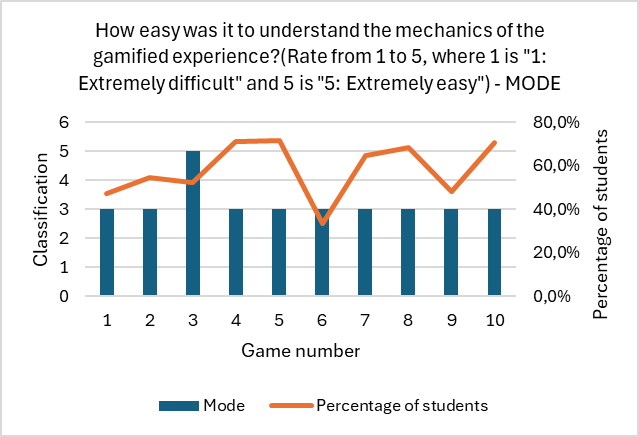
How easy was it to understand the mechanics of the gamified experience? (Rate from 1 to 5, where 1 is “1: Extremely difficult” and 5 is “5: Extremely easy”)
-
3.
How much did you learn or gain from the tasks included? (Rate from 1 to 5, where 1 is “Nothing” and 5 is “Very much”)
-
4.
Do you have any suggestions for improving the gamification aspects of this experiment? (Open answer)
The answers to these questions were crucial for improving the subsequent gamification experiments and were carefully analyzed. The following graphics represent the most common responses given by students to the four questions.
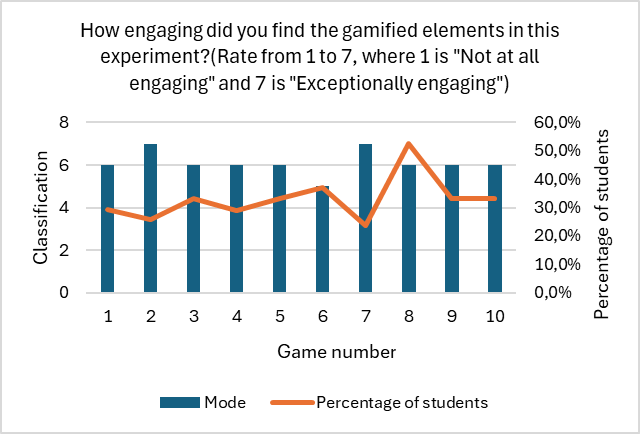
The first graphic shows the mode classification in terms of engagement for each game. The largest percentage of students (shown in Figure 8) rated their engagement between 5 and 7 for all games.
The second graphic (Figure 8) shows the mode classification in terms of ease of play for each game. The majority of students responded that the games were neither easy nor difficult for most of the games. They faced some difficulties to understand what to do, specially in the first experiment.


The third graphic (Figure 10) shows the mode classification in terms of the perceived learning gain for each game. The majority of students were positive, especially for games 6, 7, 8, and 9. It seems that by this point, students had become more accustomed to playing and taking advantage of the gamified activities. Ultimately, the results are barely positive, but we found it to be a very interesting experience that promises better results with some improvements.
The last graphic (Figure 10) summarizes the suggestions provided by students (from an open-ended question). The vast majority of students did not offer any suggestions. However, a significant percentage shared positive feedback, and only a few provided specific suggestions. The suggestions included: repeating the C programming content in all questions related to that topic; creating smaller groups for collaborative activities; writing the questions in Portuguese; and adjusting the characters and context to be more suitable for younger students.
The average final grade of all students enrolled in Imperative Programming who took at least one of the assessments was 7.0 (grade from 0 to 20). In the final season, Imperative Programming has three intermediate written tests with weighted grades 30%, 30% and 40%. The first two are done during the semester. In the supplementary season, the unit course has a final written exam with a weighted grade of 100%. Considering only the students who were involved in more than one game, we had 14 students in Class A, who obtained an average of 12.8 values, and we had 31 students in Class B, who obtained an average of 7.9 values. In both groups, the average they obtained was higher than the general average, with a bigger difference in Class B.
6 Conclusion
Within the scope of the Erasmus ThinkGame project, which is supposed to develop gamification activities and promote computational thinking and creativity, pioneering ideas emerged that are based on the exclusive use of LMS tools. Along with this, guidelines were defined that will allow the replication of experiences in other disciplines by the other project partners. In general, the students’ opinion was positive, and the project consisted of an opportunity for pedagogical innovation that simultaneously allowed for a more in-depth exploration of the resources available in LMS environments. The most significant consequence, though not immediately obvious, is the impact these activities had on increasing motivation and enhancing student engagement in programming classes. The interaction among peers was more noticeable and positively influenced by the collaborative activity implemented in one of the games. Additionally, the effort made by teachers in preparing the activities, along with the need for students to respond to the unexpected and the unknown, proved to be a highly enriching experience for both students and teachers.
References
- [1] Efrain Boom-Cárcamo, Lina Buelvas-Gutiérrez, Leticia Acosta-Oñate, and Dailyng Boom-Cárcamo. Gamification and problem-based learning (pbl): Development of creativity in the teaching-learning process of mathematics in university students. Thinking Skills and Creativity, 53:101614, 2024. doi:10.1016/j.tsc.2024.101614.
- [2] CEN - European Committee for Standardization. European e-competence framework (e-cf) - a common european framework for ict professionals in all industry sectors. https://esco.ec.europa.eu/en/about-esco/escopedia/escopedia/european-e-competence-framework-e-cf, 2019. EN 16234-1:2019.
- [3] Matt Davis. 5 critical life skills everyone should have, according to who. Neuropsych, April 28, 2019. URL: https://bigthink.com/neuropsych/5-critical-life-skills-everyone-should-have/.
- [4] Edward De Bono. Lateral Thinking: Creativity Step by Step. Harper & Row, New York, 1970.
- [5] Edward De Bono. de Bono’s Thinking Course. BBC Books, London, 1982-1991.
- [6] Sebastian Deterding, Rilla Khaled, Lennart Nacke, and Dan Dixon. Gamification: Toward a definition. In Gamification Workshop Proceedings, pages 1–4, May 7-12 2011. Gamification Workshop Proceedings, CHI 2011 Conference, Vancouver, BC.
- [7] Robert F. Eberle. Scamper: Games for Imagination Development. D.O.K. Publishers, Buffalo, New York, 1971.
- [8] Raymond D. Frost, Vic Matta, and Erin MacIvor. Assessing the efficacy of incorporating game dynamics in a learning management system. Journal of Information Systems Education, 26:59–70, 2015. URL: https://aisel.aisnet.org/jise/vol26/iss1/6/.
- [9] M. Goodman and S.M. Dingli. Creativity and Strategic Innovation Management: Directions for Future Value in Changing Times. 2nd Edition, Routledge, London, 2017.
- [10] Sue Grey. Creativity for the 21st century: A critical appraisal. In The Oxford Handbook of Creativity and Education. Oxford University Press, August 2025. doi:10.1093/oxfordhb/9780197698181.013.0040.
- [11] J. P. Guilford. Creativity. American Psychologist, 5(9):444–454, 1950. doi:10.1037/h0063487.
- [12] Kai Huotari and Juho Hamari. Defining gamification: a service marketing perspective. In Proceeding of the 16th International Academic MindTrek Conference, MindTrek ’12, pages 17–22, New York, NY, USA, 2012. Association for Computing Machinery. doi:10.1145/2393132.2393137.
- [13] Kai Huotari and Juho Hamari. A definition for gamification: anchoring gamification in the service marketing literature. JElectronic Markets, 27:21–31, 2017. doi:10.1007/s12525-015-0212-z.
- [14] Lorena Jaramillo-Mediavilla, Andrea Basantes-Andrade, Marcos Cabezas-González, and Sonia Casillas-Martín. Impact of gamification on motivation and academic performance: A systematic review. Education Sciences, 14(6), 2024. doi:10.3390/educsci14060639.
- [15] L.D. Newton and D.P. Newton. Creativity in 21st-century education. Prospects, 44:575–589, 2014. EPrint Processing Status: Full text deposited in DRO. doi:10.1007/s11125-014-9322-1.
- [16] Kingsley Ofosu-Ampong and Richard Boateng. Gamifying sakai: Understanding game elements for learning. In AMCIS 2018 Proceedings. AIS Electronic Library (AISeL), 2018.
- [17] Jose Carlos Paiva, Jose Paulo Leal, and Ricardo Queiros. Odin: A service for gamification of learning activities. In JL SierraRodriguez, JP Leal, and A Simoes, editors, Languages, Applications and Technologies, SLATE 2015, volume 563 of Communications in Computer and Information Science, pages 194–204, 2015. 4th International Symposium on Languages, Applications and Technologies (SLATE), Complutense Univ Madrid, Fac Philol, Madrid, SPAIN, JUN 18-19, 2015. doi:10.1007/978-3-319-27653-3_19.
- [18] Jane Piirto. Creativity for 21st Century Skills, pages 1–12. SensePublishers, Rotterdam, 2011. doi:10.1007/978-94-6091-463-8_1.
- [19] Gerard J. Puccio. From the dawn of humanity to the 21st century: Creativity as an enduring survival skill. The Journal of Creative Behavior, 51(4):330–334, 2017. doi:10.1002/jocb.203.
- [20] SAKAI. https://sakai.screenstepslive.com/s/sakai_help/. Accessed: 2025-04-17.
- [21] Adam Spanier, Sherri Weitl Harms, and John Hastings. A classification scheme for gamification in computer science education: Discovery of foundational gamification genres in data structures courses. In 2021 IEEE Frontiers in Education Conference (FIE), pages 1–9, 2021. doi:10.1109/FIE49875.2021.9637447.
- [22] The Sakai Project. Sakai: Collaboration and learning environment for education, 2025. Accessed: 2025-05-09. URL: https://www.sakaiproject.org.
- [23] Deepti Wadhawan and Pintu Mishra. Assessing the efficacy of incorporating game dynamics in a learning management system. Journal of Management (JOM), 11:18–32, 2024. URL: https://iaeme.com/MasterAdmin/Journal_uploads/JOM/VOLUME_11_ISSUE_2/JOM_11_02_003.pdf.
- [24] Christiane Wangenheim, Rafael Savi, and Adriano Borgatto. SCRUMIA - an educational game for teaching scrum in computing courses. Journal of Systems and Software, 86:2675–2687, 2013.
- [25] Jiyuan Zeng, Daner Sun, Chee-Kit Looi, and Andy Chun Wai Fan. Exploring the impact of gamification on students’ academic performance: A comprehensive meta-analysis of studies from the year 2008 to 2023. British Journal of Educational Technology, 55(6):2478–2502, 2024. doi:10.1111/bjet.13471.